


KOA Camping | RV, Cabin & Tent
4.73.78K Reviews
App Specs
- Version
- 4.0.26
- Updated On
- License
- Free
- Downloads
- 1,000,000+
- Developer
- Kampgrounds of America, Inc.
- Categories
- Travel & Local
- Platform
- Android, iOS
Screenshots
 Analysis by AppCompare
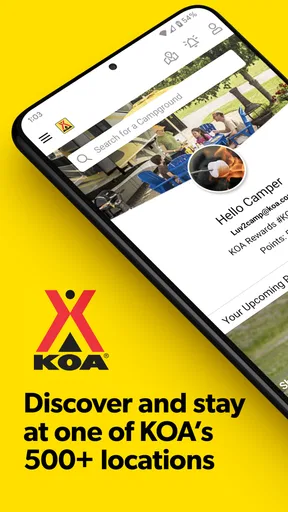
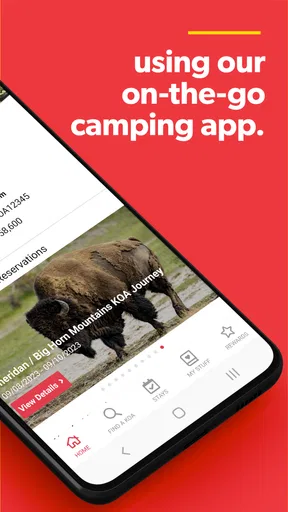
I came away from KOA Camping | RV, Cabin & Tent seeing it less as a simple campground directory and more as a trip-planning tool for people who already know they want a KOA stay. The app sits in the Travel & Local category, is free to use, and is developed by Kampgrounds of America, Inc. Its main value is bringing searching, planning, booking, and stay management into one mobile experience instead of making me jump between a map, browser tabs, notes, and confirmation messages.
That focus is important. This is not the app I would choose for discovering every independent campsite, comparing wilderness areas, or building a route around public land. It is much more useful when a KOA campground is already part of my plan and I want to move from “where could I stay?” to “which available option fits this trip?” The experience is strongest when I use it before leaving home, while its dependence on a working connection becomes more noticeable once I am driving or camping.
Planning a KOA stay before the road trip
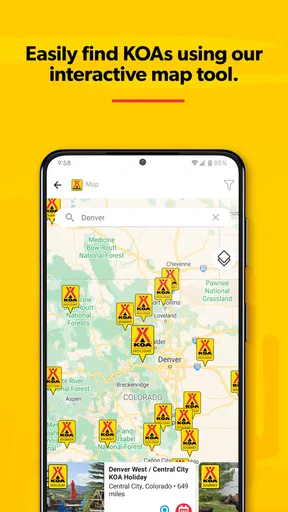
The first thing I noticed is how clearly the app follows the practical stages of a reservation. I can search for a KOA location, examine the available stay choices, and continue toward booking without treating each step as a separate task. That sounds straightforward, but it matters when I am arranging a family trip and need to keep dates, destination, accommodation type, and reservation details aligned.
The choice between an RV site, cabin, and tent-oriented stay also makes the app more relevant to mixed camping groups. A couple traveling with a camper has different needs from a family that wants a cabin or a traveler carrying only a tent. I would still read the campground details carefully rather than assuming every location offers the same arrangement. The app helps narrow the search, but it does not remove the need to think about the actual trip.
In everyday use, I would open it while planning a long weekend, search around the destination, and compare locations based on how well they fit the route. I would then review the reservation details before committing. This workflow is more reliable than choosing a place from a general map and only later discovering that the accommodation type or dates do not suit the group.
One useful habit is to treat the app as a planning workspace rather than a last-second booking button. If I am traveling with children, pets, an RV, or several people sharing one reservation, I want time to check every selection. A campground can look convenient on a map but be less practical once the final travel distance and stay type are considered.
Where the connection matters most
Search is the part of the experience most obviously tied to connectivity. The app needs to retrieve current campground and reservation information, so I would do the serious comparison while connected to dependable Wi-Fi or mobile data. This is especially important when I am checking several possible stops, changing dates, or trying to decide between a tent stay and a cabin.
Worth Reading Before You Choose

EA SPORTS FC Mobile 26 Is a Bigger Football Game, but It Takes Time

Flipboard Shows What News Apps Must Do Beyond the Feed

Switching to Android Auto Means Rethinking Your Driving Routine

Google Calendar Makes a Crowded Week Easier to Manage

Ludo King Makes the Most of the Minutes Between Plans

Baby Panda World Brings Quick Play to Modern Phones, but Its Game Library Feels Busy
Booking is another moment where I would avoid relying on a weak signal. A slow connection can make it difficult to know whether a reservation step has completed, and uncertainty is uncomfortable when dates or payment-related details are involved. My practical approach would be to wait until I have a stable connection, finish the process in one sitting, and confirm the resulting information before closing the app.
The app’s network dependence is not automatically a flaw. Current availability is valuable precisely because it needs up-to-date information. The trade-off is that the most important planning functions are less comfortable in a remote location, at a crowded event, or in a moving vehicle where reception changes constantly.
I would also avoid making a campground search while driving. The app is better used by a passenger or during a planned stop, since comparing locations requires attention. For road trips, I prefer deciding on the next stop before pulling away, then using the app again only when I can safely review the results.
Using it in different mobile situations
On a phone, the app makes the most sense before departure and at deliberate pauses during the journey. I can use it at home to organize a reservation, at a café to adjust plans, or at a rest stop to look at a different KOA destination. Its mobile format suits these short planning sessions because I do not need to carry a laptop just to review a stay.
There is a difference between mobile convenience and mobile readiness, though. A phone is easy to carry, but a campsite may have poor reception, limited battery, or too much distraction around me. I would not assume that being able to install the app means every part of the trip can be managed comfortably from a remote campground.
For that reason, I would prepare before leaving the stronger coverage area. I would review the reservation information, note the campground name and travel plan in a separate place, and make sure the phone has enough battery for navigation and communication. This is not a criticism unique to KOA; it is a sensible precaution whenever a travel plan depends on a phone.
The app is particularly convenient for travelers who make changes as they go. A flexible road trip may involve moving a stop, looking for another KOA location, or managing an existing stay from the same device used for the rest of the journey. The benefit is less about one spectacular feature and more about reducing the number of separate tools involved.
What happens when plans change
Travel rarely follows the original plan perfectly. A delayed departure, a tired driver, or a change in weather can make the next campground more important than the one chosen at home. In that situation, the app gives me a focused place to revisit KOA options and handle stay-related tasks, provided I have a usable connection.
I would not wait until the final few minutes to solve a problem. If I know that I will arrive late, change the route, or need to reconsider the type of accommodation, I would open the app while the signal is strong and review the reservation details carefully. Early action leaves more room to correct a mistake than trying to make several changes from a weak connection near the destination.
There is also a useful distinction between discovering a new stay and managing one already arranged. Searching is exploratory and may involve several locations. Managing an existing reservation should be more deliberate: I would first identify the correct stay, check the dates and location, and only then proceed with any available action. That reduces the risk of changing the wrong part of a multi-stop trip.
If the app becomes unresponsive during an important step, I would first check whether the connection is the real issue rather than repeatedly tapping. I would move to a stronger signal, reopen the app if necessary, and verify the reservation status before trying again. Repeating a booking action without checking can create confusion, especially when the first attempt may already have gone through.
This is one of the less glamorous but more valuable lessons from using travel apps: recovery depends on calm verification. The app can centralize the process, but I still need a backup habit. Keeping the campground name, dates, and confirmation information somewhere accessible outside the app gives me a way to explain the situation if the phone loses service at the wrong moment.
Keeping mobile data under control
I would not describe this as an app that needs constant attention throughout an entire camping trip. Its most data-relevant moments are searches, loading campground information, and reservation management. That makes it practical to use intentionally rather than leaving it open while traveling between locations.
When I am on a limited data plan, I would do broad searches on Wi-Fi and save my final decision-making for a focused session. Instead of repeatedly refreshing the same destination while driving, I would narrow the options first, check the details once, and then put the phone away. This also makes the trip less distracting.
Data awareness is not only about megabytes. Battery is another form of travel capacity. Searching, switching between apps, navigating, and taking photos can all compete for power, so I would avoid unnecessary browsing when the phone is already low. A compact written note containing the key reservation details is a simple safeguard that costs no battery at all.
For families, I would also avoid making every traveler search separately. One person can handle the reservation workflow while another checks the route or confirms the group’s preferences. This keeps the information consistent and prevents multiple people from making conflicting changes based on incomplete details.
The best balance is to use KOA Camping actively during planning, then rely on the resulting trip information rather than constantly reopening it. That approach respects the app’s need for connectivity without turning the phone into the center of the camping experience.
How it compares with general travel tools
A general map app is often better for seeing the entire road network, estimating driving time, and mixing campgrounds with hotels, restaurants, fuel stops, and attractions. A broad camping directory may be better for comparing public campgrounds, independent parks, and less conventional places to stay. KOA Camping has a narrower purpose, and that narrower purpose is its advantage when I specifically want a KOA option.
Using a browser can provide flexibility, especially if I am already researching a larger trip on a computer. However, a dedicated app is more convenient when I want to manage the same kind of stay from a phone. I do not have to reconstruct the search every time I return to the task, and the experience is designed around KOA reservations rather than general travel research.
I would therefore use it alongside, not necessarily instead of, a map or navigation app. The map helps me judge the route and surrounding area. KOA Camping helps me search within its own campground network and handle the stay. Expecting one app to perform both jobs perfectly would make the comparison unfair.
The same limitation defines who should skip it. If my priority is finding the cheapest possible campsite across every provider, comparing remote public-land options, or planning a trip with no KOA locations in the route, I would start elsewhere. This app is most convincing when the KOA network itself is part of the decision.
Who will get the most from it?
I think it suits road trippers, families, RV travelers, and campers who appreciate a more organized reservation process. It is also useful for someone who has stayed at KOA locations before and wants a familiar way to search and manage future trips. The ability to consider RV, cabin, and tent-oriented stays makes it adaptable to different camping styles without pretending they are identical.
A realistic example would be a family leaving after work on Friday. Before departure, I would search for a nearby KOA, compare the available stay type with the family’s needs, and complete the reservation while connected to home Wi-Fi. During the drive, I would use a navigation tool for directions and keep the KOA details available as a reference. If traffic changed the plan, I would wait for a safe stop with a reliable signal before searching again or managing the stay.
For a solo traveler, the app can reduce planning friction, but I would still compare the campground’s position against the actual route. For an RV owner, the search is more relevant than a generic hotel app, yet the reservation should be checked with the vehicle and group requirements in mind. For a tent camper, the app is useful when a KOA stop fits the route, but it may not replace a specialized tool for backcountry camping.
The age rating is Everyone, which matches the app’s travel-planning purpose. It is free to install, and its reach is reflected in a 4.7 average from around 12 thousand ratings, with more than a million installs. Those figures suggest that it has found a substantial audience, but I would still judge it by whether its KOA-centered approach matches my own camping habits.
Everyday usability and small points of friction
The strongest quality here is concentration. Search, planning, booking, and stay management belong together, so I spend less time moving information between unrelated tools. That is especially helpful when I am coordinating a trip with several stops or switching between accommodation types.
The friction comes from the same concentration. Because the app is built around KOA stays, it does not become a universal camping marketplace. I need to know what kind of comparison I want before opening it. If I am still deciding between a national park campground, a private RV park, a hotel, and a cabin, a broader travel workflow may give me a better starting point.
I also would not treat the app as a substitute for reading the reservation carefully. A smooth mobile interface can make a decision feel finished before I have considered the route, arrival timing, or suitability of the selected stay. My best results came from slowing down at the final review stage rather than rushing because the booking process was convenient.
The current version is 4.0.26, and the app supports Android 7.0 or later. That makes it accessible to people using older compatible Android devices, although travel apps are still more comfortable on a phone with enough storage, battery, and a stable connection. I would update the app before a major trip rather than waiting until I am already on the road.
My connectivity verdict
After using it as a trip companion, I would recommend KOA Camping to anyone who regularly chooses KOA campgrounds and wants one focused place to search, arrange, book, and manage those stays. Its mobile design is genuinely useful before a trip and during planned stops, especially when I want to avoid juggling a general map, a browser, and scattered reservation notes.
My recommendation comes with a clear boundary: I would not depend on it as my only source of travel information in an area where reception is uncertain. I would prepare the important details while connected, keep a separate record of the reservation, and use the app deliberately rather than repeatedly refreshing it in the middle of nowhere. That small amount of preparation makes its network dependence much easier to live with.
For broad campground discovery, a general camping directory may be the better first choice. For KOA-focused planning, however, this app is more direct than those alternatives. I like that it does not try to be every kind of travel tool. Its real strength is focused reservation management, not replacing the rest of a camper’s toolkit.
With a 4.7 average and a free entry point, it is easy to try without committing money to the app itself. I would install it before a KOA road trip, use a stable connection for the important steps, and keep navigation and backup notes separate. That combination gives me the convenience of a dedicated camping app without pretending that a phone signal will always follow me onto the road.
Pros
- Find and book campsites
- cabins
- and RV spots in one app.
- Detailed property pages make it easier to compare amenities and locations.
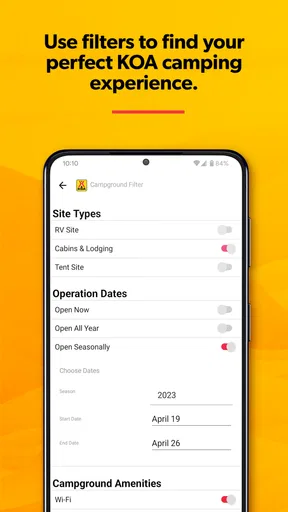
- Useful filters help narrow results by dates
- accommodation type
- and facilities.
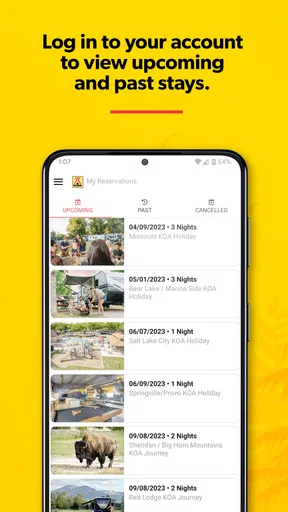
- Booking details stay organized for quick access during your trip.
- Great for discovering KOA locations along road-trip routes.
Cons
- Availability and prices can vary significantly by season and location.
- Some listings may have limited photos or incomplete amenity details.
- The app is most useful for KOA properties
- not general campground searches.
- Cancellation and change policies may differ between individual locations.
- A reliable internet connection may be needed to browse and manage reservations.
FAQs for KOA Camping | RV, Cabin & Tent
What is KOA Camping | RV, Cabin & Tent, and what can I use it for?
KOA Camping | RV, Cabin & Tent is the official app for finding and booking stays at Kampgrounds of America locations across the United States and Canada. After exploring the app, I found it useful for comparing tent sites, RV sites, cabins, and other camping options, checking available amenities, viewing campground details, and managing reservations from a mobile device.
Can I book an RV site, cabin, or tent campsite directly through the app?
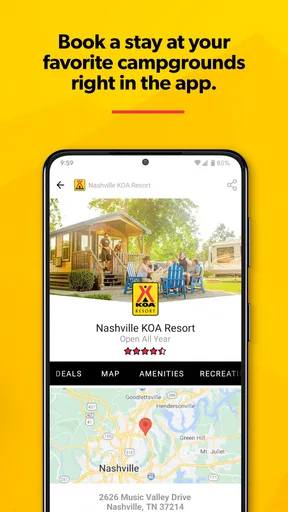
Yes. The app allows users to search for KOA campgrounds by destination, travel dates, and accommodation type, then complete a reservation within the app. Each listing typically includes pricing, site details, campground amenities, photos, and important policies. Availability and rates can change, so reviewing the final booking summary before payment is recommended.
Does the KOA app show campground amenities and site information?
The app provides useful information for planning a stay, including campground amenities, location details, accommodation descriptions, photos, and nearby attractions where available. Depending on the campground, you may also find information about Wi-Fi, pools, playgrounds, pet policies, hookups, bathrooms, and recreational activities. Details can vary by location, so check the individual listing carefully.
Can I manage or view my KOA reservations in the app?
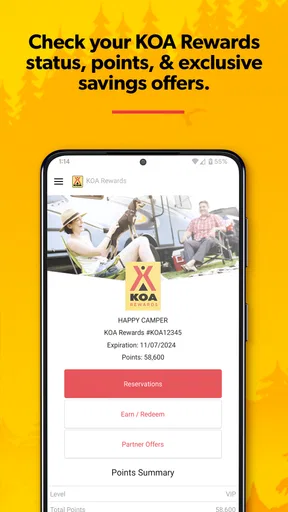
The app is designed to help users access and manage their KOA travel plans, including viewing reservation details and checking booking information after signing in. Having your confirmation details available is still helpful, especially when contacting a campground directly. Changes, cancellations, payment rules, and refund eligibility depend on the specific reservation and KOA location.
Is KOA Camping | RV, Cabin & Tent free to download, and does it require an account?
The KOA app can generally be downloaded without an upfront purchase, although your accommodation, campsite, taxes, and any applicable fees must be paid when making a reservation. Some features may be available without signing in, but creating or using an account can make it easier to save information, access reservations, and receive a more personalized booking experience.


